Identity Guard Review 2026: I Tested It for 60 Days — Here's the Honest Truth
Identity Guard earns its reputation. It’s a well-designed service with real monitoring chops — in our head-to-head test, it surfaced 31 dark web alerts compared to just 16 from HaveIBeenPwned.com on the same email addresses. That’s twice the coverage, and it’s not a fluke.
That said, we’d steer most people toward Aura instead. It’s built by the same company, it’s the more modern platform, and at roughly $12/month for individuals (versus Identity Guard Ultra at $25/month), it undercuts on price while offering more — including VPN, antivirus, a password manager, and $5M in family theft insurance versus Identity Guard’s $1M cap.
If you specifically want the cheapest possible entry-level identity monitoring, Identity Guard’s Value plan is hard to beat. For everyone else, Aura wins on value.
Bottom Line Up Front: Identity Guard is a solid, legitimate identity theft protection service — not vaporware, not a scam. But it’s also not your best option. Aura, which is owned by the same parent company, gives you everything Identity Guard offers plus more features at a lower price.
If you’re in a hurry, grab Aura with a 60-day money-back guarantee and skip the rest. If you want the full breakdown, keep reading.
What Identity Guard Will (and Won’t) Do For You
Before we get into features and pricing, let’s be honest about what this category of product actually does. This matters because Identity Guard’s marketing — like most in this space — promises a lot.
Identity Guard WILL:
- Alert you if your identity has been used for financial fraud
- Monitor the dark web for breaches of your personal information
- Provide hands-on human assistance if you become a victim of identity theft
- Help you cancel and replace cards if your wallet is lost or stolen
Identity Guard WON’T:
- Prevent your identity from being stolen in the first place — it’s fundamentally a reactive service
- Tell you if someone has taken out a wireless or cable account in your name
- Alert you to non-financial identity theft (someone using your name for a new driver’s license or passport, for example)
- Stop you from becoming a victim of tax fraud, Medicare fraud, or Social Security fraud
That last point is worth sitting with. Identity Guard is an excellent early warning system. It is not a force field. Think of it like a smoke alarm — it won’t stop the fire, but it’ll wake you up fast enough to limit the damage. Once you accept that framing, the service makes a lot more sense.
Identity Guard vs. Aura: What’s the Relationship?
This is one of the most common questions we get, and the answer is simpler than most people expect.
Identity Guard and Aura are owned by the same parent company. Aura is essentially the next-generation version of Identity Guard — a ground-up rebuild with a cleaner interface, more features, and more competitive pricing. If you’re comparing the two and wondering which to pick, you’re comparing a legacy product to its own successor.
| Feature | Aura | Identity Guard |
|---|---|---|
| Parent Company | Same company | Same company |
| Individual Plan | ~$12/month | ~$25/month (Ultra) |
| Family Plan | ~$37/month | ~$24/month (Ultra) |
| Theft Insurance | $1M per adult / up to $5M family | $1M total |
| VPN + Antivirus | ✅ Included | ❌ Not included |
| Password Manager | ✅ Included | ✅ Included |
| White Glove Fraud Resolution | ✅ All plans | ⚠️ Ultra plan only |
| 24/7 Support | ✅ 365 days | ❌ Mon–Sat only |
| Data Broker Removal | ✅ Automatic | ❌ Not available |
| Money-Back Guarantee | 60 days | ❌ |
Setting Up Identity Guard: What to Expect
Setup takes less than five minutes. That’s not marketing copy — we timed it. You enter your personal information, connect your financial accounts, and you’re looking at a dashboard in under five minutes.
The dashboard itself is clean, intuitive, and well-organized. For this review, we used the Ultra Individual plan, which is the highest tier and the only one worth evaluating in any meaningful depth. Lower tiers strip out so many features that there’s not much to review.
Here’s what you’ll find on the main dashboard:
- Alerts — Your dark web monitoring hub (more on this below)
- Monthly Credit Score — Pulled from all three major bureaus (Equifax, TransUnion, Experian)
- Home Title Monitoring — Flags suspicious activity on your property records
- Transaction Monitoring — Set custom thresholds for account activity alerts
- Safe Browsing — A browser plugin (we’ll explain why we don’t recommend this)
- Privacy Settings — Social media monitoring (also not our favorite feature)
- Security Freeze — Links to freeze credit at all major bureaus, including the often-forgotten Innovis
- Wallet Protection — Concierge service for lost or stolen wallets
The 3 Features We Think Are Genuinely Worth It
1. Dark Web Monitoring and Alerts
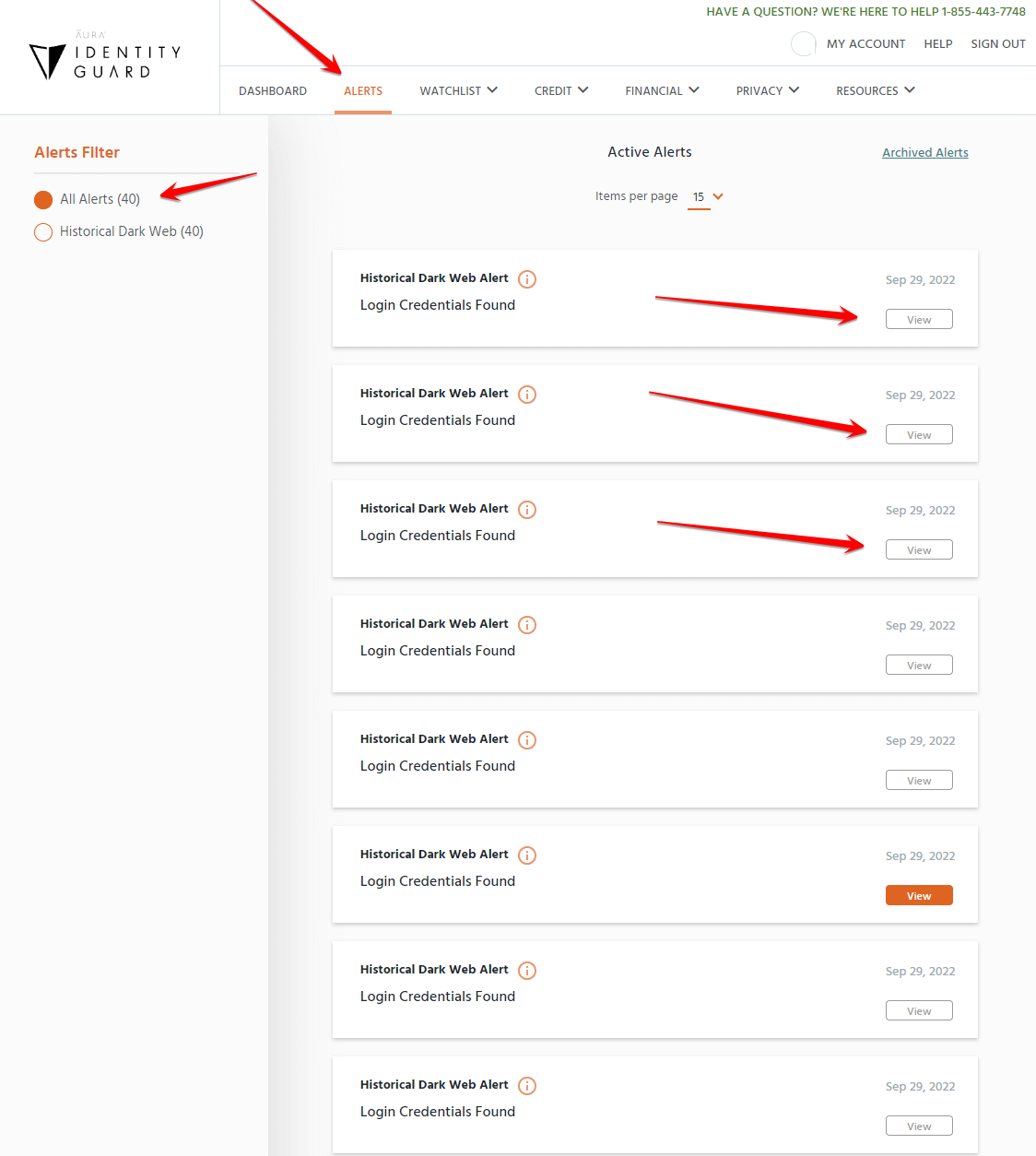
This is the crown jewel of Identity Guard’s service, and it earns that title.
When we ran our test, we connected four email addresses to the Identity Guard dashboard. We then cross-referenced those same addresses on HaveIBeenPwned.com — the gold standard free tool for checking data breach exposure.
Result: Identity Guard surfaced 31 separate dark web alerts. HaveIBeenPwned found 16 across the same addresses. Identity Guard caught nearly twice as many breaches.
What does a dark web alert actually mean? The dark web is the portion of the internet that isn’t indexed by search engines like Google or Bing. It’s accessed through Tor (a browser originally developed by the CIA) using addresses that end in .onion instead of .com. It ranges from privacy-focused forums to active markets for stolen credentials, hacked accounts, and personal data. Within about two minutes of browsing, we found sites advertising services like remote phone access, social account hijacking, and DDoS attacks — and those were on the tame end.
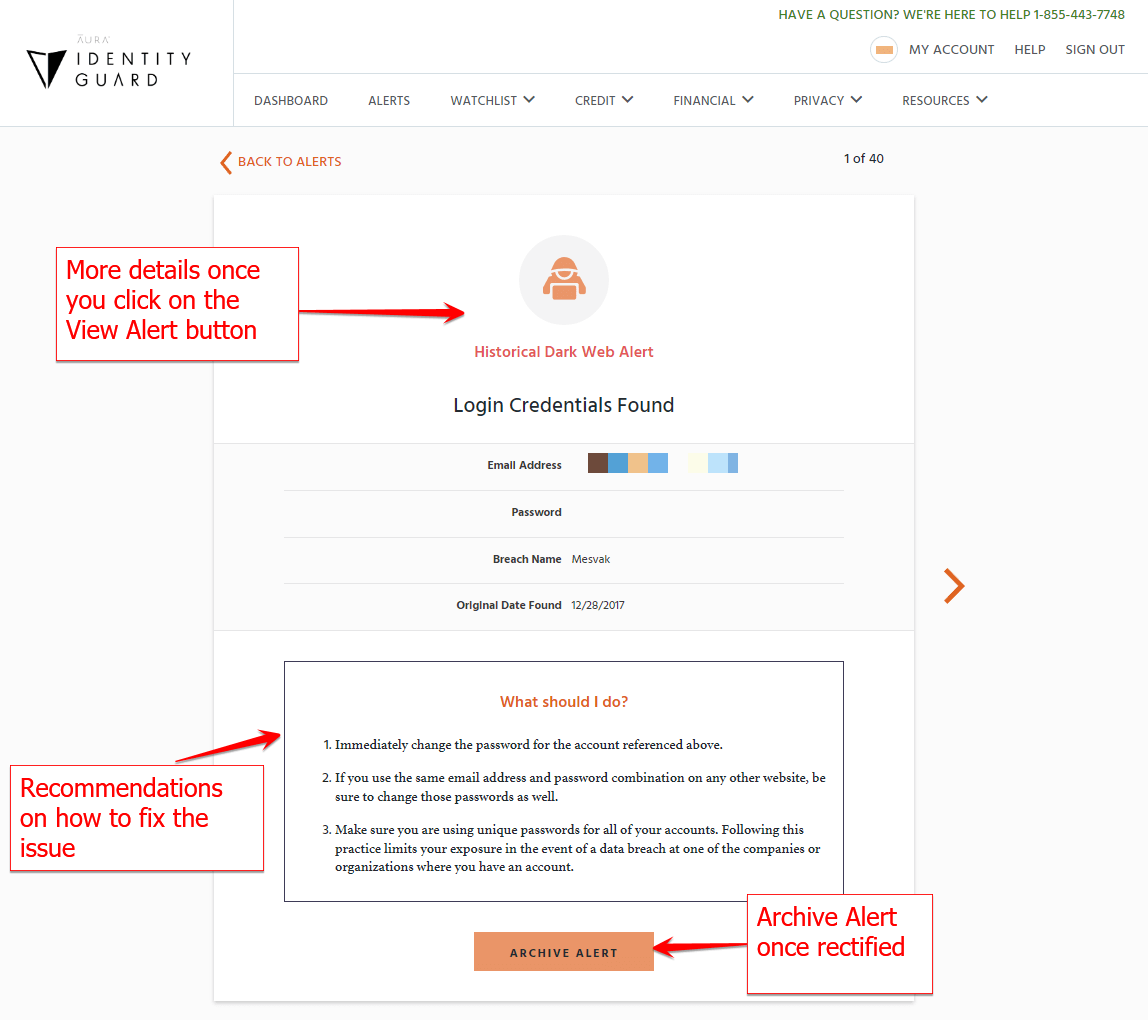
When Identity Guard finds your email or login credentials in a data dump on the dark web, you get an alert immediately. In one of our tests, we found a breach from Canva’s 2019 data leak had exposed a password. Even if that password wasn’t being reused elsewhere, knowing about it allows you to change it and close any potential vulnerabilities.
One important caveat: we can’t verify that Identity Guard catches every breach on the dark web. No service can. But catching twice as many as HaveIBeenPwned — one of the most respected tools in this space — is a meaningful signal of quality.
2. Home Title Monitoring
Home title fraud is one of the nastiest forms of identity theft because it can go undetected for months. A fraudster files paperwork claiming to be you, effectively stealing ownership of your home and potentially taking out loans against it.
With Identity Guard, you can add your property, and the system will flag any suspicious changes to your title records. We didn’t trigger any test alerts here (we’re not about to commit fraud to review a product), but the mechanism is solid and the use case is real.
If you own property in the U.S., this feature alone justifies a significant portion of the subscription cost.
3. Transaction Monitoring and Wallet Protection
Transaction monitoring lets you set custom thresholds on linked accounts: checking, savings, 401(k), investment accounts. You define the rules — for example, “alert me if any transaction in my checking account exceeds $10,000” — and Identity Guard notifies you immediately when those conditions are met.
Again: this is a lagging indicator. By the time you get the alert, the transaction has already occurred. But fast detection dramatically limits the damage, and the “if-then” customization is more flexible than most competitors offer.
Wallet Protection is a feature we genuinely like. If your wallet is lost or stolen, you call Identity Guard’s concierge line. They look up your full credit history — which lets them identify every card you’ve ever held, including ones you might not remember — and they walk you through canceling and replacing all of them. Panicking after losing a wallet is normal. Having someone calm and prepared on the other end of the phone is genuinely valuable.
The 2 Features We’d Skip
1. Safe Browsing (Browser Plugin)
We tested this by visiting OpenPhish.com — a site that hosts known phishing pages — to see whether Identity Guard’s browser extension would catch them.
It didn’t.
Chrome’s built-in Safe Browsing flagged the sites. Malwarebytes’ browser extension flagged them too. Identity Guard’s plugin missed them entirely.
Our recommendation: skip the Identity Guard extension entirely. Download Malwarebytes’ free browser extension instead. It’s more effective, it’s free, and it integrates better with your existing setup.
2. Privacy Settings (Social Media Monitoring)
The concept is reasonable — link your social media accounts and get alerts about privacy vulnerabilities. In practice, the execution falls flat.
We linked a LinkedIn account and received an alert about something being “insecure.” But the alert gave no actionable guidance. No explanation of what specifically was wrong, no recommended steps to fix it, no context for how serious the issue was. Just a vague flag.
Good security tooling tells you what’s wrong and what to do about it. This feature does neither. It also seems to occasionally log you out of connected platforms, which creates more friction than it removes.
Identity Guard Pricing: Plans and What They Actually Cost
| Plan | Individual (Annual) | Family (Annual) |
|---|---|---|
| Value | ~$7/month | ~$9/month |
| Total | ~$12/month | ~$18/month |
| Ultra | ~$18/month | ~$24/month |
Prices shown are approximate annual billing rates. Monthly billing costs more.
The honest assessment: the Value and Total plans aren’t worth spending time on. The Value plan is the only exception if you genuinely just want the $1M insurance floor and basic dark web monitoring at the lowest possible price point. The Total plan sits in an awkward middle ground that’s hard to justify.
The Ultra plan is the version we reviewed, and it’s the only one that gives you the full feature set — home title monitoring, transaction monitoring, wallet protection, white-glove fraud resolution, and full three-bureau credit monitoring.
At ~$18–25/month depending on how you pay, the Ultra plan is more expensive than Aura’s equivalent package, which starts at around $12/month and includes everything Identity Guard Ultra offers plus VPN, antivirus, and higher theft insurance.
Who Should Use Identity Guard
Identity Guard is a good fit if you:
- Already know you’ve been a victim of identity theft and need immediate help cleaning it up
- Have specific reason to believe you’re at elevated risk (a contentious divorce, a stalker situation, a recent data breach notification)
- Want the cheapest possible access to $1M theft insurance and dark web monitoring (Value plan)
- Don’t need extras like VPN, antivirus, or parental controls
Identity Guard is probably not for you if:
- You practice strong digital hygiene — unique passwords, a password manager, regular account audits. You may not need this service at all, or you could try it for one month and cancel.
- You’re mainly interested in the browser extension or social media monitoring features — those are the weakest parts of the product
- You want the best value for a family — Aura’s family plan covers more adults with more insurance for a similar price
Final Verdict
Identity Guard is not vaporware. It’s a real service with real monitoring capabilities that has been doing this longer than most. In head-to-head testing, its dark web monitoring outperformed a leading free tool by 2:1. Its wallet protection and home title monitoring are genuinely useful. Its customer support team is easy to reach and knowledgeable.
But here’s the thing: the best version of Identity Guard is Aura.
They share the same parent company, the same core monitoring engine, and much of the same philosophy — but Aura has updated the product significantly. You get more insurance for families, round-the-clock support, VPN, antivirus, and parental controls, all bundled at a lower individual price.
If you’re committed to Identity Guard specifically, go with the Ultra plan — it’s the only tier where the service really delivers. If you’re open to looking at alternatives, we strongly recommend trying Aura with a 60-day money-back guarantee before committing to anything.
Related Reviews: