
DeleteMe vs Privacy Bee 2026 — We Tested Both, Here's What Happened
DeleteMe is the better data broker removal service. After testing both with real accounts, the gap comes down to three things: coverage, honesty about that coverage, and how much work falls on you versus the service.
DeleteMe covers 986 data broker sites with human-verified removals and a dedicated personal representative. Privacy Bee claims 1,122 brokers in its sidebar — but on a Pro account at default settings, only 336 companies are actually monitored. The remaining brokers sit behind a protection slider most users will never find.
At $10.75/month versus $18/month (annual pricing), DeleteMe costs less and covers more. Privacy Bee bundles extra features — dark web scanning, search presence monitoring — but the core job of removing your data from broker sites is what both services are selling, and DeleteMe does it better.
986 sites covered · Dedicated representative · Money-back guarantee
DeleteMe vs Privacy Bee: At a Glance
| Feature | DeleteMe ⭐ | Privacy Bee |
|---|---|---|
| Broker sites covered | ✅ 986 | 336 actual (1,122 claimed) |
| Removal approach | ✅ Human-verified + automated | Automated only |
| Personal representative | ✅ Named advisor | ❌ |
| Manual work required | ✅ None | 42 manual confirmations at signup |
| Removal screenshots | ❌ | ✅ (but served from public CDN) |
| Dark web monitoring | ❌ | ✅ (0 exposures in our test) |
| Search presence monitoring | ❌ | ✅ Google, Bing, Yahoo, Yandex |
| Email masking | ✅ | ❌ |
| Default protection categories | All included | 2 of 14 (must manually expand) |
| On-demand scan | ✅ | ❌ (monthly scan only) |
| Price (annual) | ✅ $10.75/mo | ~$18/mo |
| Price (monthly) | Annual only | $39/mo |
| Family plan | 2-person and 4-person plans | $39/mo per additional license |
| Save 20% on DeleteMe | Visit Privacy Bee |
What’s The Key Difference Between DeleteMe and Privacy Bee
The Coverage Gap Nobody Mentions
Privacy Bee’s sidebar proudly displays three numbers: 1,122 Data Brokers, 185,256 Custom Sites, and a time-saved counter. These numbers are persistent across every page of the dashboard.
But navigate to the actual Data Brokers page, and a different number appears: 336 Companies Monitored.
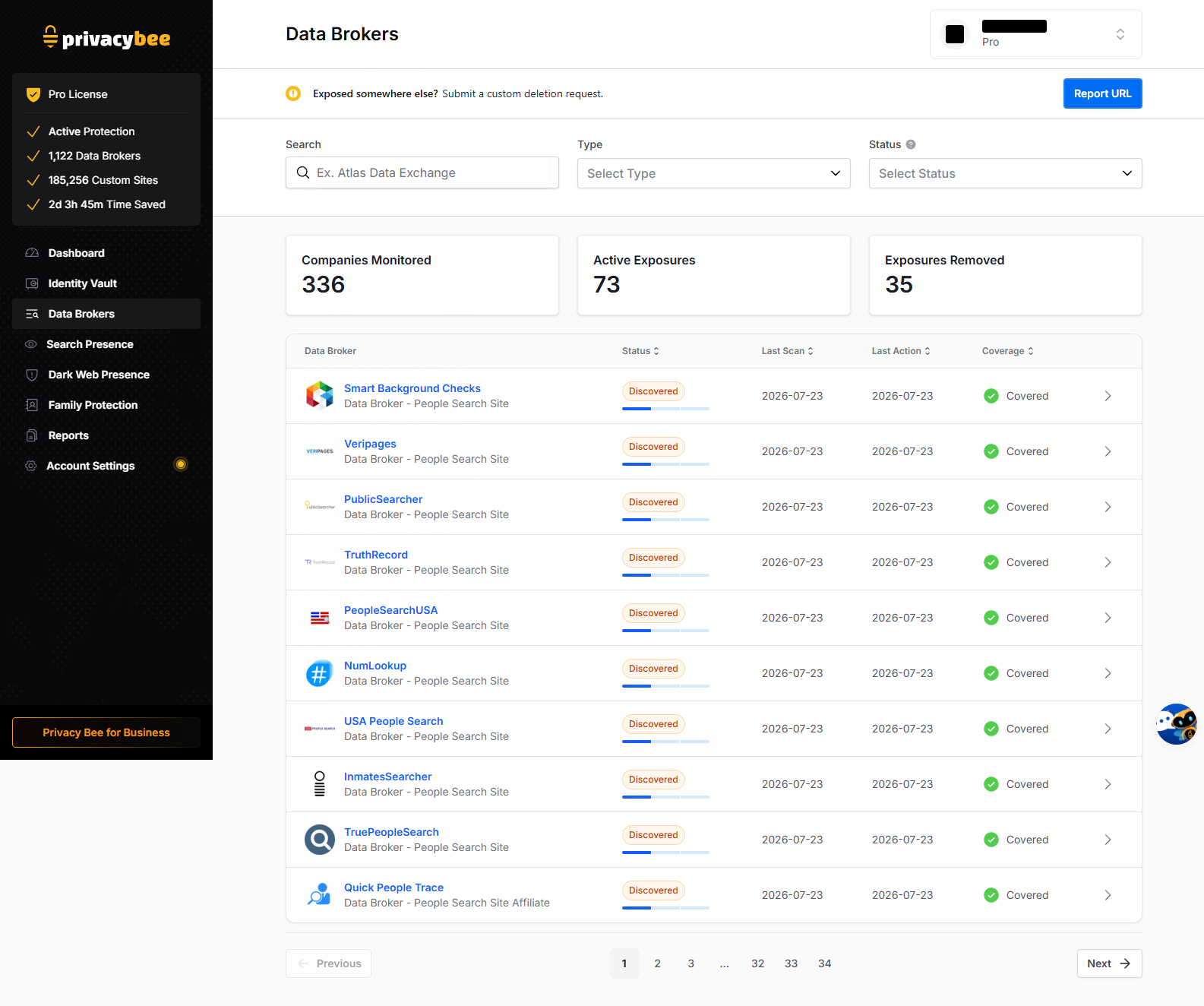
That is a significant discrepancy. The 1,122 figure appears to be the total universe of brokers Privacy Bee can theoretically cover. The 336 is what a Pro account actually monitors at default settings. The 185,256 “Custom Sites” number is never explained anywhere in the UI.
DeleteMe’s number is straightforward: 986 data broker sites, all actively scanned and removed from. No marketing ceiling, no hidden slider, no gap between what’s advertised and what’s delivered.
Default Protection Covers Only People Search Sites
This is arguably the biggest issue we found. Privacy Bee’s Protection Level ships on “Standard” — described as 2 of 14 controls active. The slider runs from Unprotected through Standard, Thorough, Expanded, Aggressive, Maximum, and Custom.
At the default Standard level, only two categories are enabled:
- People Search Sites — 360 companies
- People Search Affiliates — 157 companies
Twelve categories are off by default, including:
- AdTech & Marketing (242 companies — the single largest category)
- Data Enrichment (151 companies)
- List Brokers (130 companies)
- Healthcare & Insurance (24 companies)
- Background Check (17 companies)
- Job Recruiting, Geolocation, Surveillance Tech, and more
A user paying $39/month who never opens Settings gets people-search removal only — which is the same thing $4–8 competitors like Incogni and Optery cover at a fraction of the price.
To Privacy Bee’s credit, their in-product copy explains the tradeoff honestly: expanding protection categories requires sharing more of your data with more brokers to action removals. That transparency is better than most in this category. But default-off is still default-off — and most users never touch settings.
DeleteMe includes all coverage categories from day one. No slider, no configuration, no categories to discover.
What We Saw After 3 Days of Testing
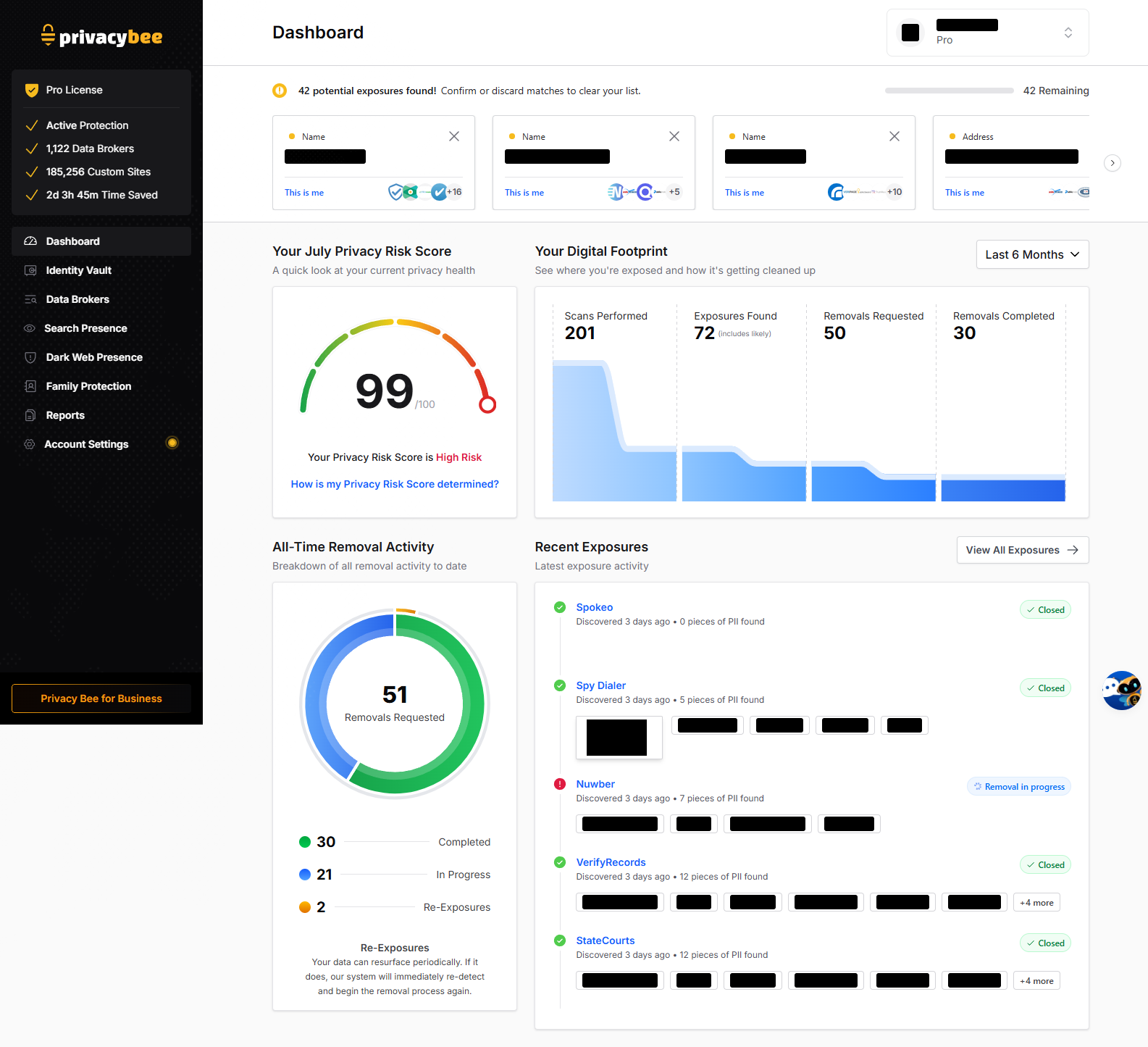
After 3 days on a Privacy Bee Pro account, here’s what the dashboard showed:
| Metric | Privacy Bee (Day 3) |
|---|---|
| Scans performed | 201 |
| Exposures found | 72 (includes likely matches) |
| Removals requested | 51 |
| Removals completed | 30 |
| Removals in progress | 21 |
| Re-exposures detected | 2 |
| Pending manual confirmations | 42 |
The first thing you see after signing up is a banner: “42 potential exposures found! Confirm or discard matches to clear your list.” Each one requires a manual “This is me” or dismiss decision. That is real unpaid labor before the service can fully start working.
DeleteMe handles this matching process through its human privacy advisors. You provide your information once, and a named representative takes it from there — no triage required.
The Privacy Risk Score Problem
Privacy Bee displays a prominent “99/100” score labeled “Your Privacy Risk Score is High Risk.” The gauge runs green-to-red left-to-right with the needle deep in the red.
The problem: 99 out of 100 reads as an A+ to every normal person. Here, it means you’re maximally exposed. This is genuinely confusing UX — the kind of thing that makes a user think they’re doing well when they’re not, or question whether the product knows what it’s showing them.
The Security Concern With Removal Screenshots
Privacy Bee provides evidence screenshots for each broker removal — showing exactly what was found before deletion. This feature is valuable and matches what Optery offers. DeleteMe does not provide screenshots.
However, these screenshots are served from a public, unauthenticated CloudFront CDN URL. A request with no session cookie and no auth header returns the full image. These images contain the subject’s name, street address, and phone number baked into the pixels — that is the entire point of them.
This means a company whose product is removing your personal information from the open internet has its own evidence pipeline serving that same information from a public URL. Anyone who obtains the link — through browser history, a shared support ticket, a forwarded email, a proxy log — can access it permanently.
This is not a claim that the bucket is enumerable or that a mass breach has occurred. It is a verifiable observation: no authentication is required to fetch a known URL containing your PII.
Where Privacy Bee Genuinely Excels
Not everything favors DeleteMe. Privacy Bee has real strengths that deserve credit:
Search Presence Monitoring. A dedicated module that tracks your name across Google, Bing, Yahoo, and Yandex search results, with per-result timelines and the ability to mark individual results as “Preserve” or “Request Removal.” No competitor in the category offers this. For professionals managing their online reputation, this is genuinely useful.
Dark Web Scanning. Privacy Bee includes a dark web module with breach-to-broker mapping. In our 3-day test it showed 0 exposures, so detection quality is unverified — but the feature exists and is more than DeleteMe offers (DeleteMe only monitors email breaches).
Protection Level Transparency. Every category has a plain-English explanation of what it does and the tradeoff involved. The Work & Income Verification warning (“some employers rely on these vendors”) is the kind of honest caveat most services omit entirely.
False-Positive Handling. “Ignored Records” suppresses a bad match from future matching, not just the current view. Better modeled than most competitors.
Security Features. TOTP two-factor authentication, passkey support, and a session activity log with device/location tracking and remote termination.
The Price Comparison
| DeleteMe | Privacy Bee Pro | |
|---|---|---|
| Annual plan | $10.75/mo ($129/year) | |
| Monthly plan | Not available (annual only) | $39/mo ($468/year) |
| Family (2 people) | ~$15/mo for 2-person plan | $78/mo (2 separate licenses) |
| Family (4 people) | ~$26/mo for 4-person plan | $156/mo (4 separate licenses) |
Privacy Bee is 1.7x more expensive than DeleteMe on annual pricing while monitoring fewer brokers at default settings. For families, the gap is even wider — Privacy Bee charges per license with no discount, while DeleteMe offers bundled family plans.
The month-to-month option is Privacy Bee’s one flexibility advantage. DeleteMe is annual-only with a 7-day money-back window. If you value trying before committing long-term, Privacy Bee lets you do that — at $39/month.
What Each Service Is Missing
DeleteMe does not offer:
- Removal screenshots or evidence of what was found
- Dark web monitoring (beyond email breach alerts)
- Search presence monitoring
- Monthly billing option
Privacy Bee does not offer:
- Email, phone, or card masking
- Human-verified removals with a personal representative
- On-demand scans (next scan is scheduled, not manual)
- API or SSO integration
- Affordable family pricing
Frequently Asked Questions
Is DeleteMe better than Privacy Bee?
For data broker removal, yes. DeleteMe covers 986 broker sites with human-verified removals and a dedicated personal representative. Privacy Bee claims 1,122 brokers but only monitors 336 at default settings on the Pro plan. DeleteMe costs $10.75/month versus Privacy Bee’s $18/month annual — and Privacy Bee’s default protection only covers 2 of 14 categories.
How many data brokers does Privacy Bee actually cover?
Privacy Bee markets 1,122 data brokers, but on a Pro account at default settings, only 336 companies are monitored. The default protection level enables just 2 of 14 categories (People Search Sites and People Search Affiliates). The remaining 12 categories — including AdTech, Data Enrichment, and Background Check sites — are off unless you manually adjust the slider.
Does Privacy Bee offer removal screenshots like Optery?
Yes — Privacy Bee provides before-and-after evidence screenshots for each broker removal, similar to Optery. However, these screenshots are served from a public, unauthenticated CDN URL. Anyone with the link can access images containing your name, address, and phone number without logging in. This is a notable security concern for a privacy-focused service.
How much does Privacy Bee cost vs DeleteMe?
DeleteMe costs $10.75/month on an annual plan ($129/year). Privacy Bee Pro costs approximately $18/month annually or $39/month with no commitment. At the annual rate, Privacy Bee is 1.7x more expensive than DeleteMe while monitoring fewer brokers at default settings.
Does Privacy Bee have dark web monitoring?
Yes — Privacy Bee includes a dark web monitoring module with breach-to-broker mapping. In our 3-day test, it showed 0 dark web exposures. DeleteMe does not offer dark web monitoring. However, the quality and depth of Privacy Bee’s dark web detection is unverified at this point.
Which service requires less manual work?
DeleteMe. Privacy Bee opened with 42 pending manual confirmations requiring individual “This is me” or dismiss decisions before removals could proceed. DeleteMe handles matching and prioritization through its human privacy advisors without requiring manual triage from the user.
Our Verdict
DeleteMe wins this comparison on the fundamentals. More broker coverage (986 vs 336 actual), lower price ($10.75/mo vs $18/mo), human-verified removals with a dedicated representative, and zero manual triage required at signup.
Privacy Bee has genuine strengths — search presence monitoring is unique in the category, the dark web module adds a layer DeleteMe doesn’t have, and the evidence screenshots (security concerns aside) provide transparency. But the core job is data broker removal, and Privacy Bee’s coverage gap, default-off categories, and higher price make it hard to recommend over DeleteMe for that specific purpose.
If you want the widest broker coverage with the least effort at the lowest cost, DeleteMe is the clear choice.
Related: DeleteMe Review | Best Data Broker Removal Service | Optery vs DeleteMe | DeleteMe Alternatives